
Make something you can walk around
Sociome. Build a world. Together.
What is Sociome?
Sociome is an AI 3D world builder. Describe an object in conversation, inspect it in a shared world, and change the things you create.
Start with something you can picture clearly: a bench with four legs, a small house with a pitched roof, or a tree with a rounded crown. Your description gives the model a subject and a few visible decisions to work with. When the object appears, move around it. The view from the side often tells you more than another sentence would.
You can refine a creation in two ways. Select an object and describe a shape change in chat, or open the editor for a direct adjustment. Position, rotation, scale, and color each have their own controls. The useful question is small: what would make this object closer to the thing you had in mind?
The world can contain other people's creations. Everyone can edit these shared models. If someone is already modifying the same object, wait for them to finish before trying again. A person-shaped model is still an object; it does not acquire an independent life, memory, or relationships. Sociome is a place to explore spatial ideas through making and revising. For a first session, build one bench, inspect its backrest and legs, then make one change you can see.
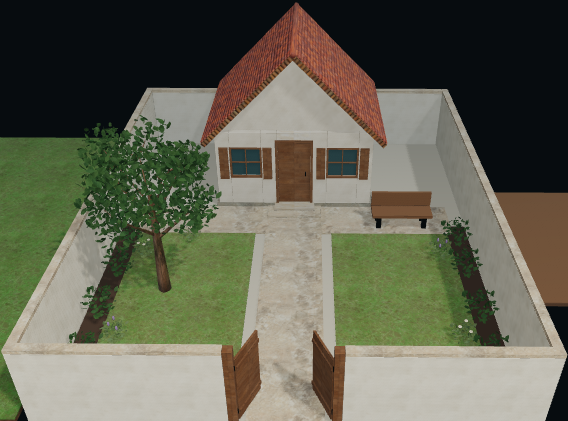
One object, three decisions
A place to sit.
Then a place around it.
You do not need to design the whole world in a single prompt. Give one object your attention before adding the next.
- 01
Name the parts.
Ask for a wooden bench with a backrest and four legs. Those parts give you something concrete to look for when the result arrives.
- 02
Check the other side.
Orbit the bench. Does the backrest meet the seat? Do the legs reach the ground? Fix the large shape before adding decorative details.
- 03
Make room for a tree.
Once the bench works, add one nearby object. Judge its scale and leave enough space to move between the two.
Keep the decision in your hands
Move it. Turn it.
Try a different proportion.
Use chat for a new shape or a missing part. Use the editor when you already know which property should change. Check the selection before saving: it should be the object you intend to change.
See the builder and its controls →- Position
- Place your object beside something familiar.
- Rotation
- Turn the front toward the view you want.
- Scale
- Check size against a bench, a tree, or a doorway.
- Color
- Change the visible color without redescribing the shape.
A useful first pass
For ideas that need a little space.
Try Sociome for a playful scene, a visual teaching example, or an early object study. Being able to move around a result makes proportions and placement easier to discuss than a written description alone.
Generation involves interpretation. Expect to inspect and revise. Sociome does not promise dimensionally exact CAD, print-ready geometry, rigged animation, or a finished game asset. If your project depends on one of those deliverables, use a specialist workflow and check its output requirements.
Choose your next step
Build, learn, or compare.
Give objects a relationship, then inspect their spacing.
02Build a small worldChoose an anchor, add neighbors, and walk through the place.
03Make a shared contributionCoordinate objects and hand off edits in the common world.
04Choose your first objectSee examples, editing controls, and the kind of result Sociome produces.
05Build a bench, step by stepTake a prompt into the world, inspect the result, and make one revision.
06Compare Sociome and EnjoyChoose between making spatial objects and creating character stories.
07Find the AI Town you meanGo to the open-source simulation or the separate Enjoy app.
Before the first prompt
Questions about Sociome.
Product information updated September 8, 2026.
How do I move around in Sociome?
On a computer, left-drag to orbit around a visible object, right-drag to turn your view, and use the mouse wheel to change your view distance. WASD or the on-screen joystick moves you through the space. Moving the camera in Sociome does not move a creation. Try a side view of your bench, then look toward its feet: those views help you judge whether the backrest connects and whether the legs reach the ground.
How do I preview a direct edit in Sociome?
Open the pencil editor and choose an object in the shared world. Change one property, then inspect the preview before saving. Use position to change placement, rotation to change orientation, scale to change proportions, or color to change appearance. Save keeps the adjustment; Cancel lets you leave a preview you do not want. After saving in Sociome, look at the object again from another angle so you can judge the change in the scene.
How do I add another object in Sociome?
Leave the current editing selection before describing a new subject. A request made while editing may be understood as a revision to the selected creation. Give the next object a short, separate brief: for example, a tree with a brown trunk and rounded green crown. Wait for its result before adding more. When arranging objects in Sociome, leave room to inspect each one and compare their sizes before making a larger scene.
What is Sociome?
Sociome is an AI 3D world builder. Describe an object through conversation, inspect it in a shared world, and refine your own creation with chat or editing controls.
What can I build first?
Start with one recognizable object: a bench with a backrest and four legs, a rounded tree, or a small house. Inspect its main parts before adding another object.
Can I edit objects made by other people?
Yes. Everyone can edit models in the shared world. If another person is already modifying the same object, Sociome asks you to wait and try again when they finish.
Do the characters live their own lives?
A person-shaped model is still an object. Creating it does not give it autonomous memories, relationships, or a life story. Sociome currently centers on object creation and editing.
Do I need modeling experience?
You can begin with ordinary language. For a direct adjustment, the editor provides position, rotation, scale, and color controls.
What if the first result is wrong?
Inspect the object from more than one angle and identify one difference. Select your own creation, make a focused revision, and check the result before changing another property.
Does opening the world start a purchase?
No. Entering the world or opening an example does not start checkout. Watch the status and any access information shown during use; this is not a promise of unlimited generation.